
Android 8.0+
폰 하나로
끝나는 재생.
One phone,
the whole chain.
기기에 있는 음악을 USB DAC 로 원음 그대로 내보내고, 헤드폰은 내 귀에 맞춥니다. PC 없이 이것만 써도 되고, PC 가 있으면 리모컨까지 됩니다. 이제 Apple Music · YouTube Music 같은 다른 음악 앱의 소리에도 CastFi 사운드를 입힙니다.
Send the music on your device to a USB DAC untouched, and tune your headphones to your ears. Complete on its own — and a remote for your PC when one is around. Now it also puts CastFi sound on other music apps such as Apple Music and YouTube Music.
Google Play 에서 받기 · v0.5.5 · 2026-10-19 · Android 8.0 이상 · 계정 없이 바로 사용
On Google Play · v0.5.5 · 2026-10-19 · Android 8.0+ · no account required
OneDrive 의 음악도 폰의 라이브러리로
Your OneDrive music, in your phone’s library
설정 > 음악 폴더 · 네트워크 · 클라우드 에서 클라우드 저장소 추가 를 누르고 Microsoft 계정으로 로그인한 뒤 음악 폴더를 고르면, 그 곡이 폰의 폴더 · NAS 곡과 나란히 앨범 · 아티스트 · 곡 · 폴더로 들어옵니다.
In Settings > Music folders · network · cloud, tap Add cloud storage, sign in with your Microsoft account and pick a music folder. Its songs join your phone and NAS music as albums, artists, tracks and folders.
- 바로 재생 — 받지 않고 스트리밍으로 재생하고, 곡 안에서 원하는 위치로 바로 넘어갑니다.
- Plays right away — songs stream without downloading first, and you can jump to any point in a track.
- 이 폰에 받아 두기 — 곡 · 앨범 · 폴더를 받아 두면 인터넷 없이 재생됩니다. 받기가 끝나면 바로 이 폰의 사본으로 재생합니다.
- Keep songs on the phone — download tracks, albums or folders to play them offline. Once a download finishes, the copy on the phone is what plays.
- 읽기만 합니다 — 고른 폴더의 음악만 읽고, 클라우드의 파일을 바꾸거나 지우지 않습니다. 곡은 Microsoft 에서 이 폰으로 바로 오며 CastFi 서버를 거치지 않습니다.
- Read only — CastFi reads only the music in the folders you pick and never changes or deletes files in your cloud. Songs come straight from Microsoft to the phone, never through a CastFi server.
- 모바일 데이터 — 설정 > 모바일 데이터 에서 스트리밍과 받기 · 동기화를 따로 켜고 끕니다. 처음에는 스트리밍만 켜져 있고, 받기 · 동기화는 Wi-Fi 에서 합니다.
- Mobile data — in Settings > Mobile data, streaming and downloads/sync each have their own switch. Out of the box only streaming is on; downloads and sync wait for Wi-Fi.
블루투스로 들을 때도 변환은 한 번만
Over Bluetooth, convert once
사운드 > 출력 > 블루투스 독점 모드 를 켜면, 블루투스 헤드폰 · 리시버로 들을 때 CastFi 가 Android 출력 레이트에 맞춰 한 번만 변환해 내보냅니다. 가능한 연결에서는 독점 MMAP 으로 재생합니다.
Turn on Sound > Output > Bluetooth exclusive mode and, on Bluetooth headphones or receivers, CastFi converts once to match the Android output rate. Where the connection allows it, playback goes through exclusive MMAP.
- 자동으로 고릅니다 — 같은 기기라도 연결 상태와 출력 조건에 따라 독점 MMAP 대신 출력 레이트 최적화로 재생될 수 있습니다. 재생할 때마다 그때의 연결로 다시 고릅니다.
- Chosen automatically — even on the same device, the connection and output conditions can mean output rate optimization instead of exclusive MMAP. CastFi chooses again from the current connection each time you play.
- 멈추면 돌려줍니다 — 1초 넘게 일시정지하면 독점 출력을 놓아 다른 앱이 바로 소리를 낼 수 있습니다.
- Released on pause — pause for more than a second and exclusive output is let go, so other apps can play right away.
- 지금 경로를 그대로 표시 — 재생 화면에 실제로 쓰는 경로가 나오고, 펼치면 Android 출력 레이트와 CastFi 가 한 변환을 따로 보여 줍니다.
- Shows the path in use — the player shows the path actually in use; expand it for the Android output rate and CastFi’s own conversion.
- 알아 둘 점 — 블루투스는 전송할 때 다시 압축됩니다. 기기로 가는 블루투스 전송 레이트는 폰과 기기가 정하며, Android 출력 레이트와 다를 수 있습니다.
- Good to know — Bluetooth re-compresses audio in transit. The Bluetooth transmission rate is set between the phone and the device and can differ from the Android output rate.
NAS 의 음악이 이 폰의 음악이 됩니다
Your NAS library becomes this phone’s library
설정 > 음악 폴더 · 네트워크 저장소 에서 NAS 나 Windows 공유 폴더를 추가하면, 그 음악이 폰의 폴더와 나란히 앨범 · 아티스트 · 곡 · 폴더로 들어옵니다. PC 를 켜 둘 필요가 없고, 브랜드를 가리지 않습니다(SMB2 이상).
Add a NAS or Windows shared folder in Settings > Music folders · network storage and its music sits next to your phone’s folders as albums, artists, tracks and folders. No PC needs to be on, and any brand works (SMB2 or later).
- 원본 그대로 — FLAC 은 USB DAC 로 비트퍼펙트, DSF 는 네이티브 DSD 로. DSD 업스케일링과 헤드폰 보정도 그대로 씁니다.
- Untouched — FLAC goes bit-perfect to a USB DAC and DSF plays as native DSD, with DSD upsampling and headphone correction as usual.
- 수만 곡도 — 처음 한 번만 읽고, 다음부터는 바뀐 곡만 다시 읽습니다. 재생 중에도 끊기지 않게 뒤에서 읽습니다.
- Tens of thousands of tracks — read once, then only changes are re-read, quietly in the background so playback never stutters.
- 이 폰에 받아 두기 — 곡 · 앨범 · 아티스트 · 폴더를 받아 두면 NAS 에 닿지 않아도 재생됩니다. 끊기면 이어받고, 같은 곡이 두 번 보이지 않습니다.
- Keep songs on the phone — download tracks, albums, artists or folders to play them when the NAS is out of reach. Downloads resume, and nothing shows up twice.
- 보기 — 내 음악의 ‘보기’에서 전체 · 이 폰 · NAS 를 골라 봅니다.
- Views — pick All, This phone or NAS from ‘View’ in My music.
- 로그인 정보는 이 폰에만 — 저장을 고르면 폰의 보안 저장소에 암호화해 두고, 어디로도 보내지 않습니다. 같은 Wi-Fi(또는 직접 설정한 VPN) 안에서 직접 연결합니다.
- Sign-in stays on the phone — if you choose to save it, it is encrypted in the phone’s secure storage and sent nowhere. Connections are direct, on the same Wi-Fi (or a VPN you set up).
쓰던 음악 앱 그대로, 소리는 CastFi 로
Keep your music app. Hear it through CastFi.
Apple Music · YouTube Music 같은 스트리밍 앱에서 곡을 틀고, CastFi 홈의 [CastFi 사운드] 를 누르면 끝입니다. 그 앱이 재생하는 소리를 받아 내 헤드폰 보정과 음장을 입혀 다시 내보냅니다. 앱을 바꾸지 않아도 듣던 음악이 CastFi 의 소리가 됩니다.
Play a track in a streaming app such as Apple Music or YouTube Music, then tap [CastFi sound] on CastFi’s Home. CastFi takes that app’s playback, puts your headphone correction and effects on it, and plays it back out. You keep the app you like — the sound becomes CastFi’s.
- 버튼 하나 — 재생 중인 앱을 홈이 알아서 찾아 제안합니다. Android 의 화면 공유 확인 창에서 허용하면 시작됩니다.
- One tap — Home spots the app that is playing and offers it. Allow Android’s screen-share prompt and it starts.
- 보정 · 음장 그대로 — 헤드폰 매칭, 취향 조정, BASS+ · CLEAR+ · WIDE+ 가 스트리밍 음악에도 적용됩니다. USB DAC 로 내보낼 때는 DSD 업스케일링까지.
- Your correction and effects — headphone matching, taste controls and BASS+ · CLEAR+ · WIDE+ apply to streamed music too. Through a USB DAC, DSD upsampling as well.
- USB DAC 또는 폰 출력 — DAC 을 꽂았으면 DAC 으로, 아니면 폰의 기본 출력으로.
- USB DAC or phone output — through the DAC when one is plugged in, otherwise the phone’s own output.
- 네트워크 스피커로도 — 재생 디바이스에서 네트워크 스피커를 골라 두면 그 스피커로 보냅니다. 이때는 보정 · 음장 없이 앱 소리 그대로 나가고, 버퍼를 쌓느라 몇 초 늦게 들립니다.
- To network speakers too — pick a network speaker under Playback device and the sound goes to that speaker exactly as the app plays it (no correction or effects), a few seconds behind while it buffers.
- 화면은 기록하지 않습니다 — 재생 소리만 받고 저장하지 않습니다. 네트워크 스피커를 골랐을 때만 같은 Wi-Fi 의 그 스피커로 보내며, 인터넷이나 CastFi 서버로는 보내지 않습니다.
- The screen is never recorded — only the playback sound is taken and it is never stored. It is sent only to the network speaker you picked on the same Wi-Fi, never to the internet or CastFi servers.
- 다른 앱 소리 확인 — 다른 앱 소리가 함께 나는지 확인하려고, Android 가 공유를 허용한 재생 소리를 이 폰 안에서만 잠깐 분석합니다. 소리가 있는지와 크기만 계산하고 바로 버리며, 저장하거나 보내지 않습니다. 다른 앱 소리가 함께 나면 CastFi 사운드가 스스로 꺼집니다.
- Checking other apps’ sound — to see whether another app is playing at the same time, CastFi briefly analyzes, on this phone only, playback audio Android allows to be shared. Only whether there is sound and how loud is calculated, then discarded — never stored or sent. If another app is playing too, CastFi sound switches itself off.
- 언제든 끄기 — 홈의 [끄기] 나 알림에서. 전화가 오면 스스로 꺼집니다.
- Off any time — from [Off] on Home or the notification. It switches itself off when a call comes in.
- 조건 — Android 10 이상, 재생 소리 캡처를 허용하는 음악 앱. 출력 기기와 연결 상태에 따라 시작되지 않을 수 있습니다.
- Requirements — Android 10 or newer, and a music app that allows its playback to be captured. Depending on the output device and connection, it may not start.
- 알아 둘 점 — 재생 소리 확인을 허용하지 않고 무엇을 재생하는지도 알리지 않는 앱의 작은 소리는 알아차리지 못해, CastFi 사운드를 쓰는 동안 함께 작아지거나 들리지 않을 수 있습니다.
- Good to know — quiet sound from apps that neither allow their playback to be checked nor report what they play can’t be detected, so it may get quieter or inaudible while CastFi sound is on.
다른 폰 · DAP 의 음악도 내 음악처럼
Another phone’s or DAP’s music, as if it were yours
음악이 든 폰이나 DAP 에서 설정 > 원격 연결과 공유 > 이 폰의 음악 공유 를 켜두면, 같은 Wi-Fi 의 다른 CastFi 기기가 내 음악에서 그 기기를 골라 PC 의 라이브러리처럼 둘러보고 재생합니다. 파일을 옮기지 않아도 됩니다.
Turn on Settings > Remote & sharing > Share this phone’s music on the phone or DAP that holds the music, and another CastFi device on the same Wi-Fi can pick it in My music and browse and play it like a PC library. No copying files around.
- 둘러보기 — 앨범 · 아티스트 · 곡 · 폴더 · 검색, 앨범 아트까지.
- Browse — albums, artists, tracks, folders and search, with album art.
- 이 폰에서 재생 — 원본 파일을 받아 내 보정 · DSD 업스케일링 · USB DAC 로 그대로 듣습니다.
- Play here — the original file streams in and goes through your correction, DSD upsampling and USB DAC.
- 그 기기에서 재생 — 곡을 고르면 음악이 있는 기기가 직접 재생하고, 이 폰은 리모컨이 됩니다.
- Play there — pick a track and the device that holds it plays it, with this phone as the remote.
- 기본 꺼짐 · 집 안에서만 — 켠 기기만, 집 안 사설 네트워크의 연결만 받습니다. 파일 경로는 알리지 않고 외부 서버를 거치지 않습니다.
- Off by default, home only — only devices you turn on, and only connections from your private home network. File paths stay hidden, and nothing goes through an outside server.
PC 와 폰이 서로의 음악을 주고받습니다
The PC and the phone share each other’s music
Windows 용 CastFi 가 같은 Wi-Fi 에 있으면 서로를 알아서 찾습니다. 폰은 PC 의 리모컨이 되고, PC 의 라이브러리는 폰의 내 음악이 됩니다. 한 번 연결해 두면 집 밖에서도 PC 의 음악을 원본 그대로 듣습니다. PC 가 없다고 해서 앱의 어떤 기능도 잠기지 않습니다.
If CastFi for Windows is on the same Wi-Fi, the two find each other. The phone becomes the PC’s remote, and the PC’s library becomes part of My music on the phone. Pair once and you can hear your PC’s music untouched even away from home. Nothing in the app is locked away when no PC is around.
- PC 리모컨 — 재생 기기를 PC 로 고르면 PC 에서 재생되는 음악을 폰에서 조작합니다. 재생 · 볼륨 · 곡 이동, 검색 · 재생목록, 헤드폰 보정 · 프리셋까지.
- PC remote — choose the PC as the playback device and run what it plays from the phone: transport, volume, search, playlists, headphone correction and presets.
- PC → 폰 스트리밍 — 내 음악에서 PC 를 고르면 PC 의 앨범 · 아티스트 · 폴더를 둘러보고, 원본 파일을 받아 폰의 보정 · DSD 업스케일링 · USB DAC 로 듣습니다.
- PC → phone streaming — pick the PC in My music to browse its albums, artists and folders, and play the original files through the phone’s correction, DSD upsampling and USB DAC.
- 폰 → PC 변환 — 폰이 버거운 높은 DSD 레이트는 PC 가 대신 변환해 폰의 USB DAC 로 돌려보냅니다(PC 변환).
- Phone → PC conversion — when a high DSD rate is too much for the phone, the PC converts it and sends it back to the phone’s USB DAC (PC conversion).
- 집 밖 스트리밍 — 설정 > 원격 연결과 공유의 [이 PC 와 지금 연결] 로 6자리 숫자를 확인해 한 번 연결하면, 다른 네트워크에서도 PC 의 라이브러리를 둘러보고 원본 그대로 듣습니다. DSF 원본도 네이티브 DSD 로(데이터 사용 동의 시).
- Away from home — pair once with Settings > Remote & sharing > “Connect to this PC now” and a 6-digit code, then browse the PC’s library and play it untouched from any network — original DSF as native DSD too (with data-use consent).
- 이 폰에 다운로드 — PC 의 곡 · 폴더를 폰으로 받아 오프라인으로 듣습니다. 집 밖에서도 받을 수 있고(Windows v0.10.5 이상 · PC 에서 허용 시), 연결이 끊기거나 Wi-Fi 와 LTE 가 바뀌어도 받은 데까지 이어받습니다.
- Download to this phone — copy tracks or whole folders from the PC and listen offline — even away from home (Windows v0.10.5 or later, when the PC allows it), resuming across drops and Wi-Fi/LTE switches.
내가 고른 폴더만 들어옵니다
Only the folders you chose
첫 실행에서 음악이 든 폴더를 직접 고릅니다. 그 폴더만 읽기 때문에 통화 녹음이나 메신저 음성 같은 오디오가 라이브러리에 섞이지 않습니다. 폴더를 빼면 그 곡만 목록에서 사라지고 기기의 파일은 그대로 남습니다.
You pick the folders that hold your music, and CastFi reads only those. Call recordings and voice notes never end up in the library. Remove a folder and its tracks leave the list — the files on your device stay where they are.
- 앨범 · 아티스트 · 곡 · 폴더 로 정리되고, 고른 정렬(최근 추가 · 이름 · 연도 등)을 기억합니다. 앨범 · 아티스트는 격자로도, 긴 목록은 빠른 스크롤로.
- Albums, artists, tracks, folders — organised, with the sort you choose (recently added, name, year…) remembered, album/artist grids and fast scrolling for long lists.
- 폰 폴더 + NAS + 클라우드 — 이 폰의 폴더와 네트워크 저장소, 클라우드 저장소(OneDrive)를 함께 담고, ‘보기’에서 전체 · 이 폰 · NAS · 클라우드로 나눠 봅니다.
- Phone folders + NAS + cloud — your phone’s folders, network storage and cloud storage (OneDrive) together, split by ‘View’ into All, This phone, NAS or Cloud.
- 중복 정리 — 같은 곡이 여러 경로에 있어도 하나로 묶어 보여줍니다.
- De-duplicated — the same track in several places is shown once.
- 재생목록 — 폰 안에서 만들고 저장되며, 재시작해도 남습니다.
- Playlists — created on the phone, saved, and still there after a restart.
- 큰 라이브러리 — 수만 곡 규모에서도 목록과 대기열이 버티도록 만들었습니다.
- Big libraries — built to hold up at tens of thousands of tracks.
폰의 오디오 경로를 건너뜁니다
It steps around the phone's audio path
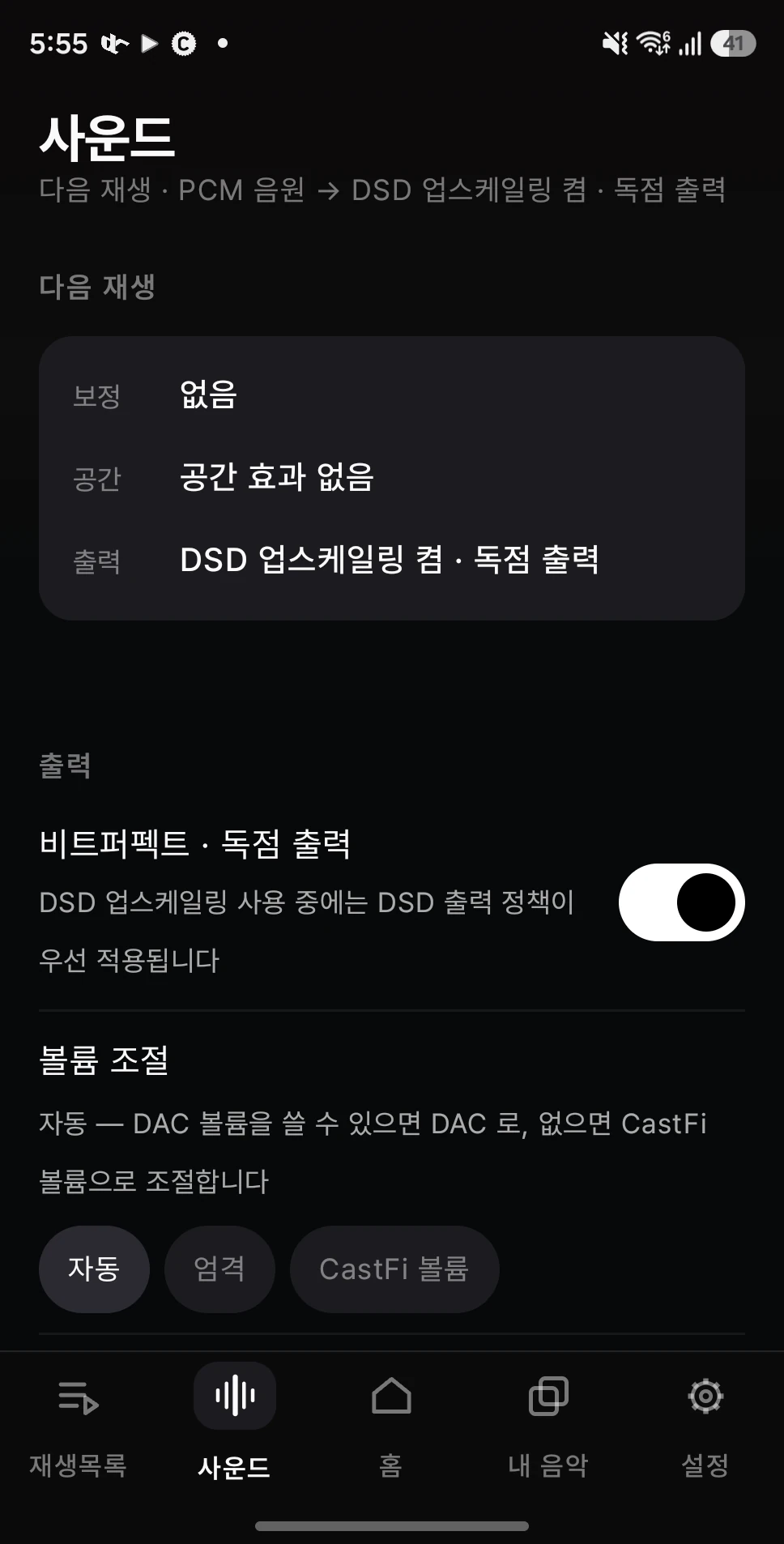
USB DAC 을 연결하면 CastFi 가 그 장치를 직접 잡고 데이터를 보냅니다. 안드로이드의 리샘플러를 거치지 않으므로, DSD 음원은 변환 없이 그대로, PCM 은 원본 형식 그대로 나갑니다.
When a USB DAC is attached, CastFi claims the device and feeds it directly. Android's resampler is out of the way, so DSD leaves untouched and PCM keeps its original format.
- 지금 나가는 형식 — 화면에 그대로 표시됩니다. 추측하지 않아도 됩니다.
- What is leaving now is written on screen. No guessing.
- 볼륨 소유권 — DAC 볼륨을 쓸 수 있으면 DAC 으로, 없으면 앱에서. 자동으로 고릅니다.
- Volume ownership — the DAC's own volume when it has one, the app's when it doesn't.
- 재생 중에만 — 재생하지 않을 때는 장치를 붙잡고 있지 않습니다.
- Only while playing — the device is never held when nothing is playing.
가진 음원이 DSD 가 아니어도 됩니다
Your files need not be DSD already
FLAC 이나 WAV 처럼 흔한 음원을 DSD 로 바꿔 내보냅니다. DSD 음원만 따로 구해 듣지 않아도, 가지고 있는 라이브러리 전체가 같은 경로를 탑니다.
Common formats such as FLAC and WAV are converted to DSD on the way out. You need not hunt for DSD releases — your whole library takes the same path.
- 자동 레이트 — 연결한 DAC 이 받을 수 있는 만큼, 기기 여유를 함께 보고 정합니다.
- Automatic rate — as high as the DAC accepts, weighed against the headroom the phone has.
- 여유가 부족하면 알려줍니다 — 조용히 음질을 낮추고 넘어가지 않습니다.
- It says so when headroom runs out — it does not quietly downgrade and move on.
- 출력 정책 우선 — 업스케일링 중에는 DSD 출력 정책이 먼저 적용됩니다.
- Output policy first — while upsampling, the DSD output policy takes priority.
감이 아니라 측정값에서 시작합니다
It starts from a measurement, not a hunch
슬라이더를 이리저리 밀어 보는 대신, 쓰시는 헤드폰 모델을 고르면 그 측정 곡선을 목표에 맞춰 보정합니다. 여기까지가 소리를 바로잡는 단계입니다.
Instead of nudging sliders until something sounds right, pick the model you own and CastFi fits its measured curve to a target. That is the step that makes it sound correct.
- 목표 헤드폰처럼 — 다른 모델의 소리를 목표로 삼을 수 있습니다.
- Sound like another model — set a different headphone as the target.
- 하만 타겟 — 널리 쓰이는 기준 곡선을 그대로 쓸 수 있습니다.
- Harman target — the widely used reference curve is available as-is.
- AI EQ — 원하는 소리를 문장으로 적으면 그에 맞춰 만들어 줍니다.
- AI EQ — describe the sound you want in words and it builds the curve.
- 정밀 EQ · 프리셋 — 결과를 직접 다듬고 저장해 둘 수 있습니다.
- Precision EQ and presets — refine the result yourself and keep it.
제대로 들린 다음에, 취향을 더합니다
Once it sounds correct, add what you like
보정이 소리를 바로잡는 단계라면, 그 위에 얹는 건 취향의 영역입니다. 숫자 대신 알아듣기 쉬운 이름으로 조절합니다.
Correction is the step that makes it right; what you add on top is a separate set of controls, named in plain language with no numbers to wrangle.
- 취향 조정 — 저음 · 보컬 · 선명도 · 공기감.
- Taste controls — bass, vocals, clarity and air.
- 음장 · 공간 — BASS+ · CLEAR+ · WIDE+ · 스피커 공간 · 크로스피드.
- Space and effects — BASS+, CLEAR+, WIDE+, speaker space and crossfeed.
- 볼륨 소유권 — DAC 볼륨을 쓸 수 있으면 DAC 으로, 없으면 앱에서.
- Volume ownership — the DAC’s own volume when it has one, the app’s when it does not.
- 자동 음량 보상 — 설정을 바꿔도 체감 음량이 튀지 않습니다.
- Level compensation — perceived loudness stays put when settings change.
집 안의 기기로 소리를 보냅니다
Send the sound to the room
폰이 리모컨이 되어 집 안의 네트워크 플레이어를 찾고 곡을 보냅니다. NAS 에 모아둔 음원도 폰에서 바로 재생됩니다. 모두 집 안 네트워크에서 직접 연결되며 중계 서버를 거치지 않습니다.
The phone becomes the control point: it finds network players in your home and sends tracks to them, and plays the library on your NAS directly. All of it happens on your home network, never through a relay.
- 네트워크 플레이어 제어 — 재생 · 볼륨 · 곡 이동을 폰에서.
- Control network players — transport and volume from the phone.
- NAS 스트리밍 — 큰 파일도 앞서 읽어 두어 끊기지 않게 합니다.
- NAS streaming — reads ahead so large files don't stall.
- 스톨 자가치유 — 네트워크가 잠깐 흔들려도 스스로 복구합니다.
- Self-healing — a brief network hiccup recovers on its own.
듣는 동안 필요한 것들
The things you actually use while listening
- 잠금화면 · 알림 컨트롤 — 화면을 켜지 않고 조작합니다.
- Lock screen and notification controls — operate without waking the screen.
- DAP 버튼 · 리모컨 — DAP 의 물리 버튼, 유선 이어폰 · 블루투스 리모컨으로 재생 · 다음 · 이전 곡.
- DAP buttons and remotes — play, next and previous from a DAP’s hardware keys, wired earphones or Bluetooth remotes.
- 홈 위젯 — 지금 곡과 기본 조작을 홈에서 바로.
- Home widget — now playing and transport, right on the home screen.
- 태블릿 · 폴더블 — 화면이 넓으면 목록과 재생 화면을 함께 보여줍니다.
- Tablets and foldables — list and player side by side on a wide screen.
- 12개 언어 — 한국어 · English · 日本語 등. 앱 설정에서 바꿉니다.
- 12 languages — including Korean, English and Japanese, switchable in settings.
시스템 요구 사항
System requirements
| 항목 | 요구 사항 |
|---|---|
| Android | 8.0 (API 26) 이상 |
| USB DAC (선택) | USB Audio Class 2.0 DAC 과 OTG 를 지원하는 기기. 받을 수 있는 형식은 DAC 마다 다릅니다 |
| 네트워크 (선택) | PC · 네트워크 플레이어 · NAS 연동은 같은 Wi-Fi 가 필요합니다 |
| 클라우드 저장소 (선택) | OneDrive — Microsoft 계정과 인터넷 연결 |
| PC (선택) | Windows 10 / 11 — 원격 제어와 음원 가져오기를 쓸 때만 |
| 다른 앱에 CastFi 사운드 (선택) | Android 10 이상 · 재생 소리 캡처를 허용하는 음악 앱 · 출력 기기에 따라 사용하지 못할 수 있습니다 |
| 언어 | 12개 언어(한국어 · English · 日本語 등) |
| Item | Requirement |
|---|---|
| Android | 8.0 (API 26) or newer |
| USB DAC (optional) | A USB Audio Class 2.0 DAC and a device that supports OTG. Accepted formats vary by DAC |
| Network (optional) | PC, network player and NAS features need the same Wi-Fi |
| Cloud storage (optional) | OneDrive — a Microsoft account and an internet connection |
| PC (optional) | Windows 10 / 11 — only for remote control and importing tracks |
| CastFi sound for other apps (optional) | Android 10+ · a music app that allows playback capture · may be unavailable on some output devices |
| Languages | 12 languages (including Korean, English and Japanese) |
폰에 있는 음악부터 제대로 들어보세요.
Start with the music already on your phone.
Android 용 CastFi 는 Google Play 에서 받을 수 있습니다(v0.5.5). Windows 용 앱과 함께 쓰면 집 밖에서도 PC 의 음악을 듣습니다.
CastFi for Android is on Google Play (v0.5.5). Pair it with the Windows app to listen to your PC’s music away from home.