
Windows 10 / 11
Every sound on your PC,
tuned to your ears.
This is not one more player. Sound from any app passes through the same correction, and when it should leave untouched, nothing touches it. What is applied is written on screen, always.
v0.10.8 · 2026-10-19 · Windows 10/11 · all releases
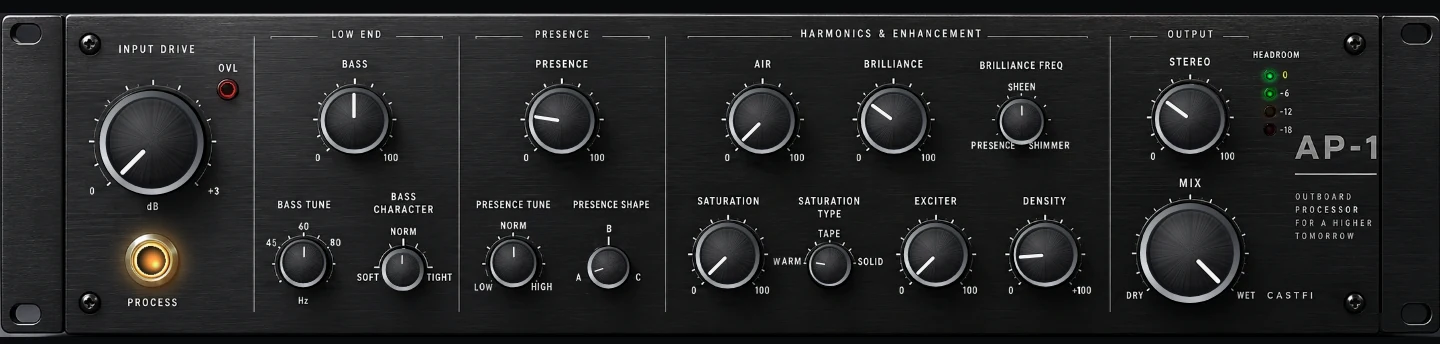
An outboard unit on your desk, shaped with knobs
Tap the AP-1 chip on the player and the unit opens in its own window. Turn BASS · PRESENCE · AIR · BRILLIANCE · EXCITER · SATURATION · DENSITY · STEREO in real time, or start from a preset. The shaped signal then passes headphone/room correction and DSD conversion on its way to the DAC — an order ordinary plug-ins cannot have.
- Presets Natural · Analog · Detail · Excited · Big plus three user slots. RESET touches knobs only, BYPASS power only.
- No dropouts while you turn a knob. Values change without the sound stopping or jumping.
- HEADROOM lamp — output is lowered by exactly what the knobs add, and the lamp lights only when attenuation is really applied. No clipping.
- A separate unit that works alongside the existing effects, speaker mode, crossfeed and FIR EQ.
You don't have to change players
Keep using the apps you already use. Streaming, browser, games — everything your PC plays goes through the same correction. No per-app equalisers to keep in sync.
- Whatever is playing is shown and controlled, whichever app it came from.
- Turn correction off and nothing is applied at all.
- Level safety stops the sudden jump when correction is switched off.
It starts from your headphone's measurement
Instead of nudging sliders by feel, CastFi looks your model up in public measurement databases and fits its curve to a target. The fit is smoothed the way human hearing resolves frequency, so it does not chase every spike in a measurement graph.
- Sound like another model — pick a different headphone as the target.
- Register your own — bring a curve you measured yourself.
- Import and export — reads and writes the common parametric EQ file formats.
Describe the sound you want
Write something like "a little more bass, clearer vocals" and CastFi builds an EQ for it. The result opens up band by band, so it works well as a starting point you then refine.
- Graphic EQ — draw the curve with the mouse.
- Parametric bands — frequency, gain and Q, precisely.
- Tone macros — bass, treble, tilt and crossfeed on single controls.
- Presets — save, group, back up and share.
Filters are synthesised, not picked from a list
CastFi converts what you have into DSD on the way out — DSD64 through DSD1024, automatically matched to what the connected device can accept.
Rather than choosing from a fixed library, CastFi generates the filter from a target response at the precision you ask for, so tap counts go as high as they need to — up to 1.5 billion. On a high-end GPU that ceiling was measured running at 38× real time.
How many taps you actually get is decided automatically from the GPU and its headroom. End to end into a real DAC, 30,964,981 taps played without a single dropout.
- GPU accelerated — heavy settings still run in real time.
- Automatic — picks a safe setting from device capability and headroom together.
- Offline conversion — or convert to files ahead of time instead.
When it should be untouched, it is
Bit-perfect exclusive output bypasses the Windows mixer and goes straight to the DAC. DSD travels untouched; PCM keeps its original format.
- Native DSD over ASIO and DoP are both supported.
- Per-device policy — DACs differ, so the working setting is remembered per device.
- DAC volume — hardware volume is used directly where the device supports it.
Nothing about the chain is hidden
The source format, everything applied along the way, and what actually leaves the machine — all on one screen. Not just a badge that says "lossless".
- Stage by stage — you can see exactly where the format changed.
- Streaming quality — shows what the service actually delivered.
Everything on your home network, in one place
Play the library on your NAS as it is, and send audio to a network player in your home. Your phone connects directly over the same Wi-Fi, never through a relay.
- Large libraries — tens of thousands of tracks still list instantly.
- Lyrics — time-synced with translation and a full-screen view.
- Music video — pick a clip per track and run it as the backdrop.
System requirements
| Item | Requirement |
|---|---|
| Operating system | Windows 10 or 11 (64-bit) |
| Output device | From built-in audio to USB DACs and ASIO hardware. Native DSD support varies by DAC |
| DSD upsampling | A GPU is recommended for the heavier settings; CastFi scales down to fit what the machine has |
| Network | Phone, network player and NAS features need the same Wi-Fi |
| Languages | 12 languages (including Korean, English and Japanese) |
The music you own, at its best.
Install it and pick your headphones. The screen tells you the rest.